
TL;DR
Server-side GTM routes all tracking through your server, bypassing ad blockers, extending the cookie lifetime, and recovering 30-40% of the conversions missed by browser-side tracking.
Use the
server_container_urlsetting on the Google Tag to route all GA4 and Google Ads hits through sGTM; do not use thetransport_urlsetting on individual tags.Meta supports deduplication via
event_id; the browser pixel and CAPI run simultaneously, and Meta merges them. Google Ads has no deduplication, so you must choose one method.A same-origin proxy (
yoursite.com/data/) outperforms a subdomain in terms of Safari ITP cookie lifetime and ad blocker resilience.The
event_idvariable in GTM must be cached per event usinggtm.uniqueEventId. Without this, deduplication silently breaks, and every conversion is counted twice.
Why Server-Side Tracking Matters in 2026
Currently, between 30% and 40% of your conversions are invisible to Google Ads and Meta. You are paying for clicks that convert, but since the platforms cannot see the conversions, they cannot optimize toward them. You are penalized for having privacy-conscious users.
This is browser-only tracking in 2026:
Ad blockers prevent tracking scripts from loading for 20%-30% of users. Those conversions disappear.
Safari ITP (Intelligent Tracking Prevention) caps third-party cookie lifetime to 7 days. Cookies set via JavaScript last 24 hours. On Safari, your attribution window is effectively one day.
Consent requirements under the GDPR and Swiss nDSG mean the tracking pixel only activates for users who actively accept cookies. The rest generate zero signal.
iOS App Tracking Transparency has further reduced the data available to Meta's algorithm.
With 30-40% of conversions invisible, ad platforms optimize using incomplete data. Meta's algorithm cannot learn which users convert. Google Ads cannot attribute conversions to the clicks that drove them. The result is inflated CPA, lower ROAS, and a wasted budget on audiences that appear promising but do not actually convert.
Server-side tracking solves this problem. Rather than relying exclusively on the browser, your server sends conversion data directly to each platform's API, bypassing browser restrictions entirely. Ad blockers cannot block a request that originates from your own server. Safari's ITP does not restrict first-party cookies set by your domain. The data gets through.
Meta's case studies report a 15-37% improvement in return on ad spend (ROAS) after implementing the Conversions API. Event Match Quality (EMQ), Meta's measure of how well it can match conversions to users, typically increases from a score of 3-5 out of 10 with the Pixel-only method to a score of 7-8 out of 10 with the Conversions API. This improvement directly translates to better optimization and lower acquisition costs.
The cost is 20€ per month for managed hosting on Stape. One additional attributed conversion per month pays for it.
The Architecture: How sGTM Connects Everything
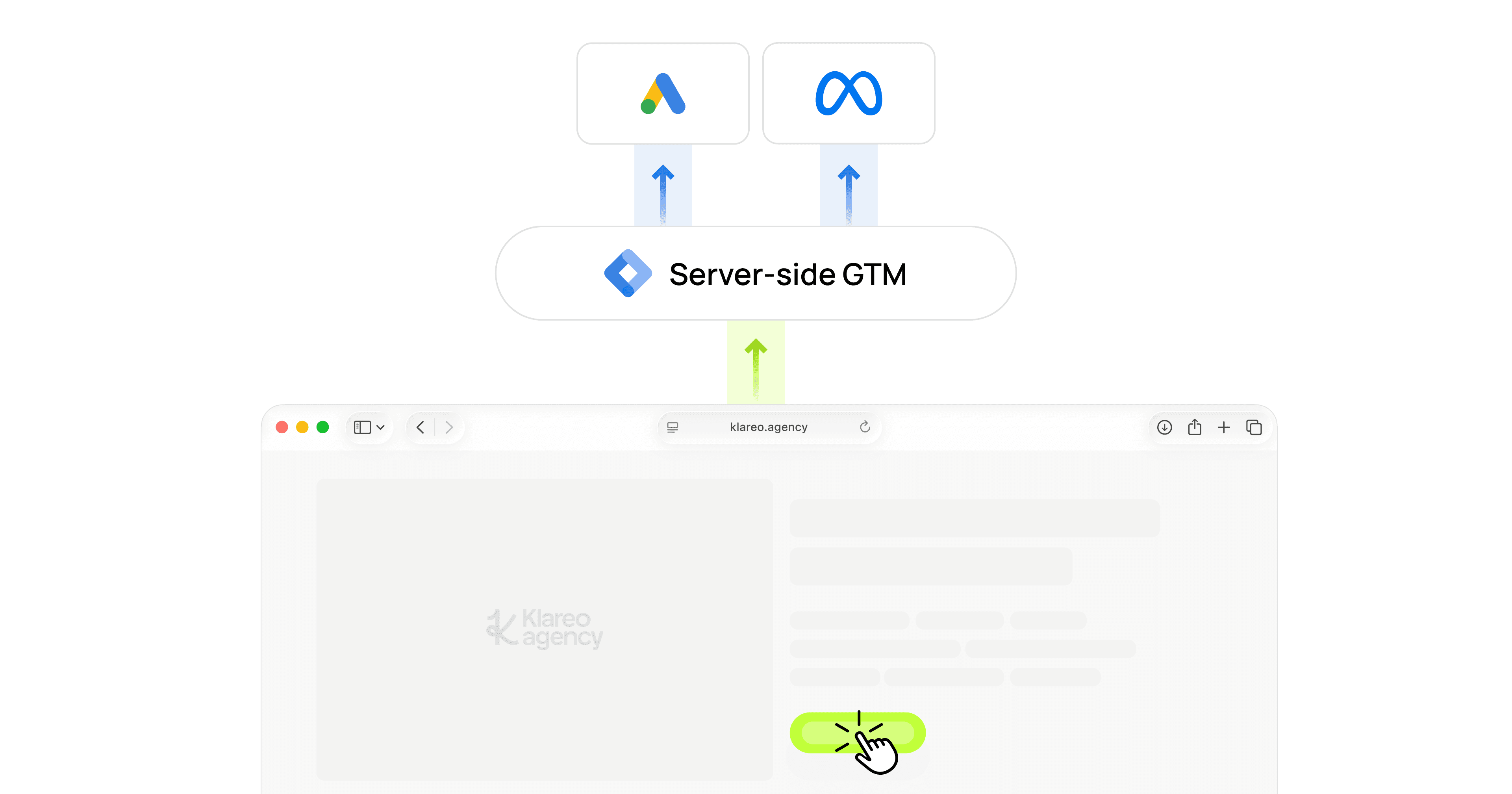
Server-side Google Tag Manager (sGTM) sits between your website and every ad platform. Here is the complete data flow:
The critical insight is that your existing GA4 event tags will not change. Add one configuration parameter, server_container_url, to the Google Tag. Then, every GA4 hit will automatically route through the sGTM instead of going directly to Google. The sGTM then forwards the hit to GA4, ensuring uninterrupted reporting, and simultaneously fires conversion tags for Google Ads and Meta.
For hosting, I recommend Stape for startups and midsize companies. Managed sGTM hosting is 20€/month and includes infrastructure, scaling, and SSL. Google Cloud Run is the alternative if you want full control, but it requires DevOps resources. Self-hosting is possible, but it's rarely worth the maintenance overhead.
Step 1: Infrastructure: Set up a same-origin proxy.
Most sGTM guides tell you to point a subdomain like sgtm.yoursite.com at your server container. That works, but it is not the best approach in 2026. A same-origin proxy is significantly better.
Subdomain | Same-origin | |
|---|---|---|
Safari ITP cookie lifetime | Capped to 7 days | Full first-party lifetime |
Ad blocker bypass | Moderate: Blocklists include known tracking subdomains. | Strong: indistinguishable from regular site requests. |
Setup complexity | DNS CNAME record only | Cloudflare Worker or nginx reverse proxy |
A same-origin proxy makes tracking requests indistinguishable from your website's traffic. Unlike subdomain-based tracking endpoints, Safari ITP does not restrict cookies set by same-origin requests. Additionally, ad blockers that maintain lists of known tracking subdomains cannot identify a path like /data/ as a tracking endpoint.
Cloudflare Worker Setup
If your site is on Cloudflare, create a Worker that proxies all requests from /data/ to your sGTM container:
Then set up a Worker Route for yoursite.com/data/* and add a request header transform rule that sets X-From-Cdn: cf-stape on requests matching /data/.
Stape Custom Loader
Once the proxy is in place, enable the Custom Loader in the Staple dashboard. This creates a modified GTM script that loads gtm.js from your domain instead of googletagmanager.com. This adds another layer of ad blocker resilience because the GTM library itself loads from your domain.
Step 2: Route All Hits Through sGTM with One Setting
This is the part that most guides overcomplicate. You don't need to modify every GA4 event tag. One configuration parameter on the Google Tag does it all.
server_container_url vs transport_url
The server_container_url parameter on the Google Tag is the recommended way to route all GA4 and Google Ads hits through a server-side GTM container as of 2025. It replaces the older transport_url approach, which required modifying individual GA4 event tags.
There are two ways to route hits through sGTM:
server_container_urlon the Google Tag (Tag ID: Your Google Tag/AW- or GT-ID). This setting routes all GA4 and Google Ads hits through sGTM. As of 2026, this is the current best practice.The
transport_urlon individual GA4 event tags is an older approach. It produces the same result, but you must add it to every tag. It requires more maintenance and is easier to miss.
Use server_container_url. Add it as a Configuration Parameter on your Google Tag:
Step 3: The Deduplication Problem (and Why Google Ads Makes It Harder)
Most implementations go wrong here, and no existing guide provides a complete picture. Each platform handles browser-side and server-side tracking differently.
Platform | Run Both Sides? | Dedup Mechanism | What to Do |
|---|---|---|---|
Meta | Yes |
| Keep browser Pixel + add CAPI. Share the same |
Google Ads | No | None | Run server-side only. Remove web-side conversion tags after verification. |
GA4 | Not applicable | Single data path |
|
Meta CAPI: The event_id Caching Gotcha
Meta deduplication relies on a shared event_id between the browser Pixel event and the server CAPI event. The standard advice is: "Create a Custom JavaScript variable that generates a unique ID, and use it in both tags."
That advice is incomplete, and following it literally will break deduplication.
Here is the problem: GTM Custom JavaScript variables are re-evaluated every time they are referenced. If your Meta Pixel tag and your GA4 event tag both reference {{CJS - event_id}}, and the function inside calls crypto.randomUUID(), each tag gets a different UUID. The browser Pixel sends one ID to Meta. The GA4 tag sends a different ID through sGTM to the CAPI tag. Meta sees two events with different IDs and counts them separately.
Your conversions are double-counted, and nothing in any dashboard will tell you.
The fix is to cache the generated ID per GTM event. GTM assigns a unique gtm.uniqueEventId to every dataLayer event. Use it as a cache key:
Step 1: Create a Data Layer Variable called {{DLV - gtm.uniqueEventId}}:
Variable type: Data Layer Variable
Data Layer Variable Name:
gtm.uniqueEventIdData Layer Version: Version 2
Step 2: Update your {{CJS - event_id}} variable:
Now, both the Meta Pixel tag and the GA4 tag, which fire on the same trigger, have the same event_id. Different events still receive unique IDs. Deduplication works as intended.
I discovered this the hard way during a client implementation. The GTM Preview showed two different UUIDs for the same event. A quick search confirmed that this is a known behavior of custom JavaScript variables. However, no sGTM setup guide that I found mentions this behavior in the context of event_id deduplication.
Google Ads: No Dedup, So Test in Parallel
Google Ads does not offer deduplication between client-side and server-side conversion tags. If you use both types of tags, every conversion is counted twice.
The safe migration strategy is to:
Create separate secondary conversion actions in Google Ads for your sGTM tags. These secondary actions are tracked but do not influence bidding.
Run both the primary (web-side) and secondary (sGTM) tags for one to two weeks. Compare the conversion counts.
Once the sGTM conversion counts match or exceed the web-side conversion counts, promote the sGTM conversion actions to primary and pause or remove the web-side conversion tags.
Also remove the web-side "Google Ads User-Provided Data Event" tag — Enhanced Conversions are now handled server-side.
Do not skip the parallel testing phase. If your sGTM is misconfigured and you switch to Primary without a baseline, you will lose conversion data and your bidding strategies will lose signal.
Step 4: Essential sGTM Tags (and the One Everyone Forgets)
Your sGTM container needs exactly four types of tags:
1. Conversion Linker: The Most Forgotten Tag
The Conversion Linker tag is required for any server-side Google Tag Manager (GTM) container that runs Google Ads conversion tracking. It reads gclid and dclid from the URL and stores them in first-party cookies (_gcl_aw). Without this tag, Google Ads cannot attribute conversions to clicks. The Conversion Linker must fire on every page_view event.
This tag is the most commonly missed in sGTM setups. I have audited containers where everything else was configured correctly, yet conversions showed as zero because the Conversion Linker was missing. Adding it only takes 30 seconds. Do it first.
2. GA4 Forwarding
Google Analytics: GA4 tag fires on all events and forwards them to Google's servers. Without it, your GA4 reporting will be unavailable the moment the server container URL is active. No special configuration is needed because it automatically forwards the incoming hit.
3. Google Ads Conversion Tracking
One tag per conversion action. Enter your conversion ID and conversion label. The tag automatically reads user_data (email, name, and phone number) from the incoming GA4 request for enhanced conversions. No additional server-side configuration is required. This is one of the cleanest advantages of the sGTM approach. Enhanced Conversions work automatically once user data flows through GA4.
4. Meta CAPI (Stape Template)
One tag per event. Use the Stape "Facebook Conversions API" template. It handles SHA256 hashing of user data, consent checks, and _fbp/_fbc cookie reading automatically.
Important: Set the Event Name Setup Method to "Override," not "Inherit from client." If you choose "Inherit," the CAPI tag will send the GA4 event name (e.g., "sitter_continue_clicked") to Meta instead of the standard Meta event name ("InitiateCheckout"). Meta will not recognize it as a standard event, which will cause your reporting and optimization to break.
Consent: It Propagates Automatically
If your web container tags only fire after consent is granted via a CMP like Usercentrics or Cookiebot, then your sGTM tags will automatically respect consent. Since no GA4 hit reaches sGTM without consent, no CAPI or Google Ads event fires without consent either. No additional consent triggers are needed in the server container.
What to Expect After Launch
First 48-72 Hours: Monitor Everything
Check daily:
GA4 Real-Time: Are events still flowing? Are there any gaps compared to before?
Meta Events Manager: Do the events show "Server" as a source, in addition to "Browser"? Are they marked as deduplicated?
Google Ads: Are the sGTM conversion actions registering conversions?
Stape Dashboard: Request counts and error rates. Are there any 4xx or 5xx responses?
Expected Results
Metric | Before (Pixel/client-side only) | After (sGTM + CAPI) |
|---|---|---|
Meta EMQ score | 3-5 out of 10 | 7-8 out of 10 |
Visible conversions | 60-70% of actual | 90-95%+ |
CPA | Baseline | 15-20% reduction (over 2-4 weeks) |
ROAS | Baseline | 15-37% improvement |
Monthly cost | 0€ | ~20€ (Stape hosting) |
Improvements in CPA and ROAS are not instant. Ad platforms need two to four weeks to relearn with the improved signal. However, the EMQ improvement and increased conversion visibility are immediate.
Key Takeaways
Server-side tracking is the new standard for any paid acquisition setup. Browser-only tracking misses 30-40% of conversions, which means your bidding algorithm never learns from those missed conversions.
Use
server_container_urlon the Google Tag; one setting routes everything through sGTM. Do not usetransport_urlon individual tags.Use a same-origin proxy over a subdomain. Note that Safari ITP, ad blockers, and privacy browsers all treat same-origin requests as first-party.
Meta and Google Ads handle deduplication differently. Meta uses
event_id(run both sides). Google Ads has no deduplication (pick one side).Cache your
event_idusinggtm.uniqueEventId. GTM reevaluates custom JavaScript variables per tag; without caching, deduplication fails silently.Do not forget the Conversion Linker. Without it, Google Ads attribution in sGTM is ineffective.
Enhanced Conversions work automatically in sGTM once user data flows through GA4. Remove redundant web-side tags.
Hosting costs 20€ per month and pays for itself with a single additional attributed conversion per month.
In short, clean tracking provides algorithms with better data. Better data gives algorithms more room to find the right users at the right price. Every technical decision in this guide serves this outcome: lower Cost per Acquisition (CPA), higher Return on Ad Spend (ROAS), and Paid Ads Campaigns that drives growth.
Need help setting up server-side tracking for your ad accounts?
We help startups and growth teams implement sGTM, repair broken tracking, and establish a data foundation that ensures profitable ad spending, whether you are starting from scratch or migrating from a browser-only setup.